Zend Framework URL Rewriting in IIS7
This post is part of a series about my experiences building a PHP app for Windows Server 2008 and IIS 7 for the European WinPHP Challenge 2009 which is sponsored by iBuildings, Microsoft and Leaseweb.
To get my Zend Framework Tutorial working with my IIS7 & MS SQL server set up, I needed two things:
- A Sqlsrv adapter for Zend Framework.
- A replacement Apache’s mod_rewrite module.
I’ve already covered the Sqlsrv adapter, so let’s look at rewriting requests with IIS7’s URL Rewrite module. As with everything in IIS, you get at this tool via the IIS Manager GUI. Be aware though that the Url Rewrite icon is available at server level and at the website level.
You need the website level which is accessed under the “Sites” section which is under the “Server name” section. In my case it is called “Default Web Site”. You now click on “Import Rules” on the right hand action list and get this screen:
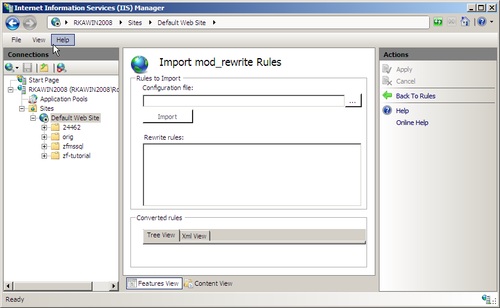
Simply paste in these rules:
RewriteCond %{REQUEST_FILENAME} !-f
RewriteRule ^.*$ /zf-tutorial/public/index.php [NC,L]
and press “Apply”
Note that this rules doesn’t match the official ZF rules, but it performs essentially the same functionality and generates a much clearer rule within the IIS URL Rewrite manager.
Also, you need to put the full path to the index.php file for it to work. It’s much easier to create a new website within the IIS manager and point it at the public directory.
My Zend Framework tutorial website is now working though, so it’s full steam ahead on the actual application.



doesn't work
This worked for me, however, since I set my site's physical path to "/zf-tutorial/public/" I had to change the following rewrite rule slightly to only point to index.php and not the full path:
RewriteCond %{REQUEST_FILENAME} !-f
RewriteRule ^.*$ index.php [NC,L]
And it worked!!!
Your kind post saved my life, great thanks !
My hero.. I spent hours trying to figure this out.
I have an additional action on my index controller that I can't work out.
The action name is news and it won't even display in IIS7 unless I use the path: /project/public/index.php/index/news
Where it displays fine, so I tried to create a rewrite for "/News" to the above path and I get Zend error "Invalid controller specified (News)"
A redirect works fine, but it looks funky and destroys the point of my index rewrite. Any ideas how to overcome this?
i create a zend application and hosted on IIS7, made web.config changes using URL Rewriter in IIS. I have pages like website.com/aboutus
Our client wants website.com/about-us, i tried URL rewrite module in IIS 7 but it does'nt work and every time i get about-us/index.phml controller error.
Help would be greatly appreciated.