Bootstrapping modules in ZF 1.8 and up
I’ve started to play with modules in a Zend Framework 1.8 application as the new autoloader means that all your model directories no long have to be on the include_path for autoloading to work. What I’m specifically interested in is being able to instantiate a model that is within a module from within another module.
Setting it all up isn’t that hard, but I couldn’t find a concise description, so these are my notes on it.
Start by creating a ZF application using the zf command line tool:
$ zf create project myproject
Don’t forget to put a copy of ZF 1.8 into the library directory or ensure that it is on the include_path.
We now need a module:
$ cd myproject
$ zf create module blog
This will create all the relevant directories in myproject/application/modules/blog. We create a simple model within the blog module:
File: myproject/application/modules/blog/models/Info.php
<?php
class Blog_Model_Info
{
public function getInfo()
{
return "This is the info about the Blog module";
}
}
The naming is important. First we have the module name, then we have the word “Model” then we have the name of the model itself. It is important that this model’s name matches the filename too.
We want to use this model within the index action of the Index controller like this:
File: myproject/application/controller/IndexController.php
<?php
class IndexController extends Zend_Controller_Action
{
public function init()
{
/* Initialize action controller here */
}
public function indexAction()
{
// action body
$info = new Blog_Model_Info();
$this->view->blogInfo = $info->getInfo();
}
}
I’ve included the entire class here; most of it is auto-generated, you just need to add the two new lines under the // action body comment. Having assigned something to the view, we should display it so we can prove it worked:
File: myproject/application/views/scripts/index/index.phtml
<?php echo $this->blogInfo; ?>
(Note that we replace the pretty ZF welcome page.)
At this point we get an error:
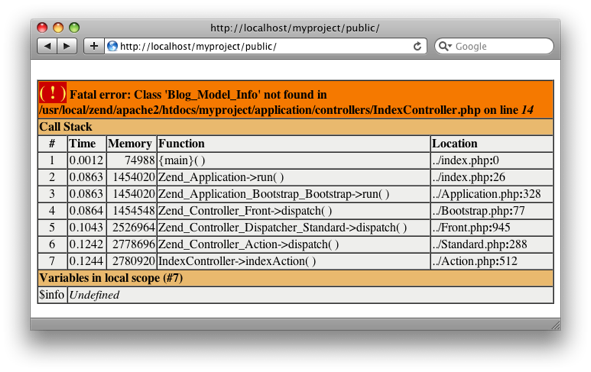
This is because we haven’t told the autoloader about our module’s model’s directory. This is done using Zend_Application‘s bootstrapping. There are two parts:
Firstly we have to add a line to application.ini enable modules at the end of the [production] section:
File: myproject/application/configs/application.iniresources.frontController.moduleDirectory = APPLICATION_PATH "/modules"
resources.modules[] = ""
Secondly, we need to add a Bootstrap class to our module:
File: myproject/application/modules/blog/Bootstrap.php
<?php
class Blog_Bootstrap extends Zend_Application_Module_Bootstrap
{
}
Again, the naming is important; the class name must be {module name}_Bootstrap and it must extend Zend_Application_Module_Bootstrap. It must be stored in a file called Bootstrap.php within the root of the module.
That’s it. If you refresh the page, you’ll get the data from the Blog module’s Info model within the default module:
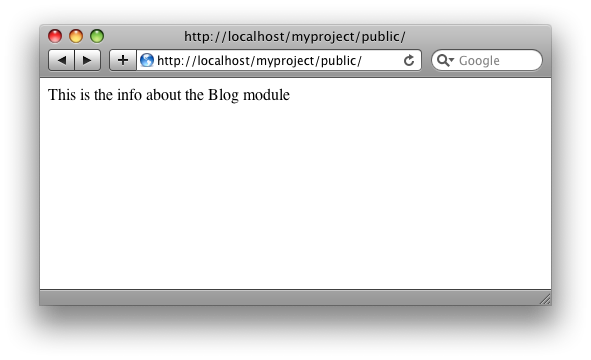
All in all, it’s not difficult at all, but if you don’t have those two lines in application.ini and define a module bootstrap class, then it doesn’t work.



Hello,
I had set the modules directory with the line resources.frontController.moduleDirectory. But, you know what the above line does??
resources.modules[] = ""
If I had set the module's directory, why I need another line?
P.S.: I'm using the "default" module structure of Zend
Jonathan,
They do different things:
resources.frontController.moduleDirectory is a configuration parameter for the frontController and resource. resources.modules tells Zend_Application to load the modules resource which in turn looks for module bootstrap classes.
Regards,
Rob…
can you show your 'myproject' all directory?
eric,
Just use the ZF command line tool and you'll have it :)
Regards,
Rob…
Thanks Rob,
not much but very useful info
One issue that I just hit using modules is that it does not like to find your forms. I created a form class that extended Zend_Form and stored it in /ispadmin/forms/EditKeyword.php and inside that I have
class IspAdmin_Forms_EditKeyword extends Zend_Form { }
However everytime I try to instanciate the object I get the following fatal error. I am not sure why it cannot find my forms, it finds my controllers and models just fine.
Fatal error: Class 'IspAdmin_Forms_EditKeyword' not found in /Users/jcrawford/Work/ispkw/application/models/DbTable/ISPKeywords.php on line 26
on line 26 of ISPKeywords.php I have this
$form = new IspAdmin_Forms_EditKeyword($row, $id);
I also tried adding
resources.forms[] =
to my application.ini since that was needed for the modules to work I thought maybe it would be required for the forms but that just led to this error.
Fatal error: Uncaught exception 'Zend_Application_Bootstrap_Exception' with message 'Unable to resolve plugin "forms"; no corresponding plugin with that name' in /usr/local/zend/ZendFramework-1.8.4/library/Zend/Application/Bootstrap/BootstrapAbstract.php:327 Stack trace: #0 /usr/local/zend/ZendFramework-1.8.4/library/Zend/Application/Bootstrap/BootstrapAbstract.php(377): Zend_Application_Bootstrap_BootstrapAbstract->getPluginResource('forms') #1 /usr/local/zend/ZendFramework-1.8.4/library/Zend/Application/Bootstrap/BootstrapAbstract.php(389): Zend_Application_Bootstrap_BootstrapAbstract->getPluginResources() #2 /usr/local/zend/ZendFramework-1.8.4/library/Zend/Application/Bootstrap/BootstrapAbstract.php(592): Zend_Application_Bootstrap_BootstrapAbstract->getPluginResourceNames() #3 /usr/local/zend/ZendFramework-1.8.4/library/Zend/Application/Bootstrap/BootstrapAbstract.php(553): Zend_Application_Bootstrap_BootstrapAbstract->_bootstrap(NULL) #4 /usr/local/zend/ZendFramework-1.8.4/library/Zend/Application.php(317): Zend_Appl in /usr/local/zend/ZendFramework-1.8.4/library/Zend/Application/Bootstrap/BootstrapAbstract.php on line 327
Any Ideas?
hello akrabat,
your solution has one important drawback. Having 100 modules for example it would load them all upon startup, which could be major overhead.
I have build a controller plugin and action helper which kind of works like an "import" of modules into certain other modules and laods the current modules resources by default.
I should blog about it, i guess!
hi
i try to create directory structure like this
application config application.ini controllers layouts views models forms admin controllers AdminController.php layouts views scripts admin admin.phtml models forms bootstrap.php library css images index.php This is my bootstrap.php fileclass Bootstrap extends Zend_Application_Bootstrap_Bootstrap { protected function _initAutoLoad() { $autoloader = Zend_Loader_Autoloader::getInstance(); $autoloader->suppressNotFoundWarnings(false); $moduleLoader = new Zend_Application_Module_Autoloader( array( 'namespace'=>'', 'basePath'=>APPLICATION_PATH ), array( 'namespace' => 'Admin', 'basePath' => APPLICATION_PATH . '/admin') ); return $moduleLoader; } function _initViewHelpers() { $this->bootstrap('layout'); $layout = $this->getResource('layout'); $view = $layout->getView(); $view->doctype('XHTML1_STRICT'); $view->headMeta()->appendHttpEquiv('Content-Type', 'text/html;charset=utf-8'); } }This is my application.ini filewhen i try to access http://localhost/Site/index.php/admin
It does not show the admin page.
It shows only layout page.
I think i am missing front controller settings.
But i dont know in which file i have to set frontcontroller and what code to be write in that?
Please help
I think directory structure does not print approximately.
In application folder, there are config,controllers,forms,views,models,layouts,admin and Bootstrap.php file.In admin there are models,controllers,views files. index.php file in root with images,css,library.
Hi, I have two questions:
– how i can setup different path to layout for every module?
– how i can setup different View for every module?
P.S. Sorry for my English
Anton,
Use a Front Controller plug-in as you need to do those things after routing has taken place.
Regards,
Rob…
I am not quite sure about the layout question but when you setup the modules as specified above each module uses it's own models, controllers, views, forms, etc.
/application/modules/mod1/
controllers/
forms/
models/
views/
Now I using Front Controller plugin:
public function dispatchLoopStartup(Zend_Controller_Request_Abstract $request)
{
// Set the layout directory for the loaded module
$layout = Zend_Layout::getMvcInstance();
$layout ->setLayoutPath(APPLICATION_PATH . '/modules/' . $request->getModuleName() . '/layouts/scripts');
}
But I want to use only application.ini (code not working):
; Modules
resources.modules[] = "admin"
resources.modules[] = "default"
; Layouts
resources.layout.layout = "layout"
resources.layout.layoutPath = APPLICATION_PATH "/modules/default/layouts/scripts"
admin.resources.layout.layout = "layout"
admin.resources.layout.layoutPath = APPLICATION_PATH "/modules/admin/layouts/scripts"
Anton,
You can want to use only application.ini, but it's not possible to do what you want :)
This is because routing hasn't occurred at bootstrapping and so the choice of layout cannot be made.
Regards,
Rob…
Thx for quick HOWTO.
@Anton Shevchuk *woekaround* is here:
http://blog.keppens.biz/2009/06/create-modular-application-with-zend.html
Hi Rob, Thanks for the great tips.
With this set-up I came into a problem with view helpers. I am also using a layout with the following structure.
/application /layouts layout.phtmlIf I define a viewhelper BaseUrl in the
default view helper directory ie.
/application /views /helpers BaseUrl.phpIf I use this helper in my layout.phtml and point my browser to the module blog (which uses the same layout script), I get an error saying that BaseUrl helper is not found. If I place the same helper file in the Blog modules helper directory then i dont get this error.
Any idea on how to get around this issue, instead of having duplicates of helpers everywhere?
Actually to simplify the question.
How can we use view helpers defined in the root view helper directory, in our modules?
For example, I define BaseUrl in
how can i access it in a viewscript located in the Blog module? Currently I think i would have to have the same view helper defined in the helpers folder of the Blog module.
hey Rob,
I just wanted to say thanks for your easy to learn step by step manual. I was dealing with this for 2 days but now I see it's not too hard.
Thanks!
Hi Joseph,
Did you ever find a solution to the forms in modules problem?
Regarding the error:
Fatal error: Class 'IspAdmin_Forms_EditKeyword' not found in /Users/jcrawford/Work/ispkw/application/models/DbTable/ISPKeywords.php on line 26
Tina and Joseph,
it should be `Class IspAdmin_Form_EditKeyword`
notice the missing S on Forms
just like Controllers directory is Controller in file, Models Directory is Model in file, Plugins directory is Plugin in file, etc
Thanks a lot! It helped me a lot!
Muchas gracias, llevaba mucho tiempo tratando de solucionar ese problema y es tu pagina encontre la solucion.
Saludos desde Colombia!
Rob,
Thank you for posting this. It works great when I run my app.
However, I'm having problems testing (with PHPUnit) even model classes. The tests are not finding the my classes.
Could you post how you setup your environment for testing?
Thanks greatly,
Mike.
Excellent tutorial! Great job.
thanks for answering my question in other post. this tutorial is great.
The model works fine for non-default model
I try to create a model under
/application/modules/default/models/Info.php
which still get the error, I try with/without "Default_" in model class and bootstrap,
Do you know why ?
<?php
class Default_Model_Info
{
public function getInfo()
{
return "This is the info about the default module";
}
}
Never mind. I figured out my problem.
Hi! Thanks for article. I have the same problem like cc96ai. I try to put my models in dir application/models and application/modules/default/models and naming it with prefix "Default_", "Default_Model_" and "Model_".
I also add to the include path dir "application/models".
But still get a error.
After adding this two lines in application.ini
resources.frontController.moduleDirectory = APPLICATION_PATH "/modules"

resources.modules[] = ""
i transfer folder application/controllers to modules/default/controllers, because application can't find errorController else.
fixed by adding the folowing code in bootstrap
protected function _initAutoload()
{
$mLoader = new Zend_Application_Module_Autoloader(array(
'namespace' => 'Default',
'basePath' => APPLICATION_PATH . '/modules/default',
));
}
and now
$defaultModel = new Default_Model_Info() works.
class name is Defaul_Model_Info
thanks
>resources.frontController.moduleDirectory = APPLICATION_PATH "/modules"
helped me a lot.
"zf create module " doesn't do it.
Good explanation and you saves me ;)
Thanks I could not find this in the docs.. only kinda crazy that all module bootraps load on every request.. kinda defeats the purpose lol.
I have the same problem of Joseph on #7
Fatal error: Uncaught exception 'Zend_Application_Bootstrap_Exception' with message 'Unable to resolve plugin "db"; no corresponding plugin with that name' in C:wampwwwFabrizio_GargiulomungiellolibraryZendApplicationBootstrapBootstrapAbstract.php:330 Stack trace: #0 C:wampwwwFabrizio_GargiulomungiellolibraryZendApplicationBootstrapBootstrapAbstract.php(379): Zend_Application_Bootstrap_BootstrapAbstract->getPluginResource('db') #1 C:wampwwwFabrizio_GargiulomungiellolibraryZendApplicationBootstrapBootstrapAbstract.php(391): Zend_Application_Bootstrap_BootstrapAbstract->getPluginResources() #2 C:wampwwwFabrizio_GargiulomungiellolibraryZendApplicationBootstrapBootstrapAbstract.php(621): Zend_Application_Bootstrap_BootstrapAbstract->getPluginResourceNames() #3 C:wampwwwFabrizio_GargiulomungiellolibraryZendApplicationBootstrapBootstrapAbstract.php(582): Zend_Application_Bootstrap_BootstrapAbstract->_bootstrap(NULL) #4 C:wampwwwFabrizio_GargiulomungiellolibraryZendApplication.p in C:wampwwwFabrizio_GargiulomungiellolibraryZendApplicationBootstrapBootstrapAbstract.php on line 330
Any ideas?
Is it the correct version of ZF?
Great, it works! Thank you, i also couldn't find this in official website.
Hi,
The example works, but when I created :
modulesBlogcontrollersIndexController.php and tried to access with :
http://local.storefront.com/blog/index/
It is showing following error:
Exception information:
Message: Invalid controller specified (index)
Stack trace:
#0 C:xamppphpPEARZendControllerFront.php(946): Zend_Controller_Dispatcher_Standard->dispatch(Object(Zend_Controller_Request_Http), Object(Zend_Controller_Response_Http))
#1 C:xamppphpPEARZendApplicationBootstrapBootstrap.php(77): Zend_Controller_Front->dispatch()
#2 C:xamppphpPEARZendApplication.php(358): Zend_Application_Bootstrap_Bootstrap->run()
#3 C:xampphtdocsstorefrontpublicindex.php(26): Zend_Application->run()
#4 {main}
Request Parameters:
array (
'module' => 'blog',
'controller' => 'index',
'action' => 'index',
)
How to resolve this issue?
Why zend developer use comma on last array field?
protected function _initAutoload()
{
$mLoader = new Zend_Application_Module_Autoloader(array(
'namespace' => 'Default',
'basePath' => APPLICATION_PATH . '/modules/default', <<<<<– COMA
));
}
Hi,
Not sure but php does not give error (as java, javascript etc gives) if you put a comma in the last of an array declaration . That mostly happens when we copy and paste array elements and forgot to remove it.
:)
thanks,
Rakesh Rawat