Simple Zend_Layout Example
Zend_Layout is in the trunk now, so here’s a super simple MVC example that shows it in action:
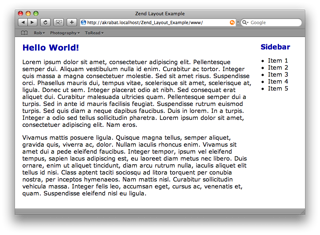
This example consists of three view files: the outer layout file, the index action view script and a right hand side bar. The remainder of this post describes the key files. If you just want to poke around with the code, then it’s at the bottom, so page down now!
Setting up
This is the directory layout:
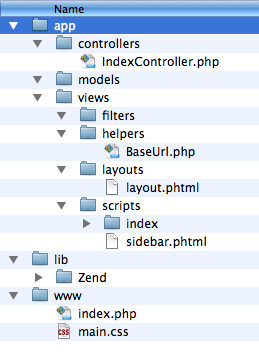
As you can see, it’s the standard layout and we have one controller, Index, with one action (also index). For good measure, I’ve thrown in a view helper to collect the base URL to reference the CSS file and also render into a sidebar.
Let’s look at the bootstrap file, index.php, first:
<?php
define('ROOT_DIR', dirname(dirname(__FILE__)));
// Setup path to the Zend Framework files
set_include_path('.'
. PATH_SEPARATOR . ROOT_DIR.'/lib/'
. PATH_SEPARATOR . get_include_path()
);
// Register the autoloader
require_once 'Zend/Loader.php';
Zend_Loader::registerAutoload();
// Initialise Zend_Layout's MVC helpers
Zend_Layout::startMvc(array('layoutPath' => ROOT_DIR.'/app/views/layouts'));
// Run!
$frontController = Zend_Controller_Front::getInstance();
$frontController->addControllerDirectory(ROOT_DIR.'/app/controllers');
$frontController->throwExceptions(true);
try {
$frontController->dispatch();
} catch(Exception $e) {
echo nl2br($e->__toString());
}
This is a standard bootstrap with the exception that we initialise the Zend_Layout using the startMvc() function. This takes an array of options, but the one thing you really need to pass in is the directory to find the layout files. I’ve chosen app/views/layouts as it makes sense in this case. If you are using modules, then maybe app/layouts would be better.
The controller
The index controller contains two functions: init() to render the sidebar to a named response section for use in the layout and then the indexAction() which just puts some text into the view:
<?php
class IndexController extends Zend_Controller_Action
{
function init()
{
// Render sidebar for every action
$response = $this->getResponse();
$response->insert('sidebar', $this->view->render('sidebar.phtml'));
}
function indexAction()
{
$this->view->pageTitle = "Zend Layout Example";
$this->view->bodyTitle = '<h1>Hello World!</h1>';
$this->view->bodyCopy = "<p>Lorem ipsum dolor etc.</p>";
}
}
Two-step view
The view is now two-step. This means that we split our HTML between multiple files. The first step is to render the “inner” scripts, such as the sidebar and the action specific scripts. Then we render the “outer”, layout script which embeds the rendered “inner” scripts.
The “inner” scripts
The action view script, index/index.phtml is trivial as it just needs to display the text relevant to the index action only:
<?php echo $this->bodyTitle ;?>(told you it was simple!)
<?php echo $this->bodyCopy ;?>
The sidebar.phtml is similarly, just the HTML required for our sidebar:
<h2>Sidebar</h2>

<ul>

<li>Item 1</li>

<li>Item 2</li>

<li>Item 3</li>

<li>Item 4</li>

<li>Item 5</li>

</ul>
Again, nice and easy HTML, for this example at least!
The layout script
The layout script, layout.phtml, ties it all together. It contains the HTML that is common to all pages on our website and uses the special construct <?php echo $this->layout()->content ?> to render a named response segment. Note that the view renderer will render to “content” for the action controller’s script.
The layout script looks like this:
<!DOCTYPE html PUBLIC "-//W3C//DTD XHTML 1.0 Transitional//EN"

    "http://www.w3.org/TR/xhtml1/DTD/xhtml1-transitional.dtd">

<html xmlns="http://www.w3.org/1999/xhtml" xml:lang="en" lang="en">

<head>

    <meta http-equiv="Content-Type" content="text/html; charset=utf-8" />

    <title><?php echo $this->escape($this->pageTitle); ?></title>

    <link rel="stylesheet" href="<?php echo $this->baseUrl(); ?>/main.css" type="text/css">

</head>

<body>

    <div id="content">

        <?php echo $this->layout()->content ?>

    </div>

    <div id="sidebar">

        <?php echo $this->layout()->sidebar; ?>

    </div>

</body>

</html>
For simplicity, we use the baseUrl view helper to retrieve the base URL from the request (via the Front Controller) and we render our two named response segments (content and sidebar) using the view helper layout() which is provide by Zend_Layout.
Conclusion
That’s all there is to it. We could have use the partial() view helper to render the sidebar script and coming soon to a svn tree near you is other useful view helpers such as headScript() and headTitle() which will make the <head> section easier to manage.
Here’s a zip file of this project: Zend_Layout_Example.zip(It includes a snapshot of the trunk of the Zend Framework which is why it’s 3MB big.)
It works for me, at least.



Excelent example !! One question, is it possible to change the extension of the views and the layouts from .phtml to .html ?
lol… so easy to understand. Too bad the framework manual won't be so straightforward. Could you consider getting Zend to pay you to rewrite the entire manual?
So, we again have PHP code in the templates… and HTML in the PHP code.
Dennis,
The HTML in the controller is because it's unimportant for this example. In a "real" application, you would retrieve the data from the model presumably.
Zend_View is designed to allow PHP in the view templates, so I'm not sure what the problem there is. If you don't want PHP in the view, then you can use Smarty or XSLT or whatever you like really. For the purposes of showing how Zend_Layout works with Zend_View, PHP in the view templates is inevitable.
Regards,
Rob…
Thanks for putting together an easy to understand example. One thing that would be nice would be to have an example where there is actually some logic in the sidebar – basically having the sidebar being the result of an action in another controller…
hi akra,
what if i wanted to use a different layout? how would i do that? can i change layouts between controllers/actions?
in post #4, regarding the models; should i do all the SQL-queries in the model and call them from my actions? is this the best practice? or am i just confused :-/
@dennis: Maybe you didn't understand the principle of separating html and php (don't ge me wrong, thats no offence!). The idea behind is that you do not use any business logic in your html code. but no problems using php for your output logic in the html files. therefore you can mix php and html code as long as it is just for displaying purposes.
Regards,
daniel
Hey, I made my own implementation of how to "inject" a rendered view into a template (thx to #zftalk @ freenode), I just make a plugin, then when you render a view into some controller action I get the body of this render and then I send it to the template as a variable, this is the code:
TemplatePlugin.php
http://paste2.org/p/10572
So to disable the template rendering I just set a param into the controller action to the request object:
$this->getRequest()->setParam( 'tplDisable', true );
That's it :), is not the best thing but works simple :).
I want to reiterate what sinus asked. My own personal site, which uses ZFW 0.6 and my own extension of Zend_View, has 3 different layouts. The ability to select the layout based on the Controller is extremely important, at least for me.
Is that option in Zend_Layout? I don't see that ability in your example.
Rob,
Thanks again for another great tutorial.
Fercho,
To change suffix the easiest and fastest way I found was to do it in bootstrap.
Instead of:
Zend_Layout::startMvc(array('layoutPath' => ROOT_DIR.'/app/views/layouts'));
Do:
$layout = new Zend_Layout($config->layout, true);
$layout->getInflector()->setStaticRule('suffix', 'tpl.php');
sinus,
to change layouts in controller/action do:
$this->_helper->layout->setLayout('new');
This is a question about best practice.
Layout can use the following to render data:
//View Helper
$this->content();
//Placeholder
$this->placeholder('content');
//Response Segment
$this->layout()->content;
// Render
$this->render('content.tpl.php');
When to use each one???
Thanks a lot for very useful example, Rob. Such examples is best learning practice for me!
Thanks Rob.
I'm wondering if you are a teacher
Jason,
Nope :) I'm the Technical Director of a small web development company in Gloucestershire.
I don't have the patience to teach!
Regards,
Rob…
Rob, well, I succesfully removed all header/footer includes from view-scripts – thanks Zend_Layouts and your example – and want more now… maybe dumb.
I have several actions in controller and have several view-scripts (.phtml) – 1 script for 1 action as usual. Each view-script consist of one line of code, same for all scripts:
PHP Code:
txt;?>
Can I replace several view-scripts with just one? If I can, which code does such miracle?
Thanks a lot :)
Rob,
I worked it through like "getting started" and "Auth". But I'm still evaluating whether I get all functionallity like with HTML-Frames and JavaScript. I.e I can refresh only one frame :
<JavaScript with parent.KOM.document){open();writeln(");</ For example on the left side all records, on the rigth side the details of the record I have just parked on. Can I do this with Zend_Layout or do I need JSON ?
Inspite of this, example was good to understand like all your tutorials.
Have a peaceful christmas time !
Niko
Hi Akrabat, I wanted to know the same than sinus,
"what if i wanted to use a different layout? how would i do that? can i change layouts between controllers/actions?" Is it possible now? what are the advantages of using this instead of rendering parts of the view like the old behavior?
Thanks in advance
I found the answer to my question in Zend_Layout comments thread.
Here's the link if somebody is interested:
http://framework.zend.com/wiki/display/ZFPROP/Zend_Layout?focusedCommentId=40139#comment-40139
(Answer by Matthew Weier O'Phinney)
As for all those wishing to know how to change the used layout, the manual says you can use $this->_helper->layout->setLayout('foobaz'); in your action controller.
Anyway, I wanted to use Zend_Layout to render the header, sidebard etc., but for now I'm sticking with using placeholders since I can use setPrefix(), setIndent() and setPostfix() with those…
@Dennis
I don't even see a point. Smarty: {$my_variable}… Zend: (or shorter: ). What's the big picture? I agree there should not be any code inside a view/template but what you will always need is a placeholder/variable for your content to be displayed (at least i do).
@Rob: Great tutorial, thx
doh!
my php examples got cut out…
1:
2:
…i could cry. Now that i want to be a smartass i fail miserably
Sorry for the spam. Now i am the dumbass and have a question. Do i get the idea right, that i need to include the sidebar in every controller i use?
($this->getResponse()->insert('sidebar', $this->view->render('sidebar.phtml'));)
That seems to be redundant to me or is there some idea behind it? I'd love to see some default behaviour which could be overridden on demand. My idea to that would be to extend the Zend_Controller_Action class and inherit all my controllers from that one. In controllers where the sidebar is not needed i would just override the init() function.
Would that be a good practice?
Doc Olson,
For this sort of case, I would use an action helper to add sidebar functionality.
Regards,
Rob…
Can I disable the layout from an action. example: I have indexAction uses the tayout but I have another action ajaxAddAction this will only return a value.
I tried this:
$this->_helper->layout->disableLayout();
$this->view->pageTitle = "Example";
$this->view->bodyTitle = 'Add';
but it rendered the side bar also.
Hello.
Help me please to rewrite this example. I don't want this text in every contrloler:
function init()
{
$response = $this->getResponse();
$response->insert('navigation', $this->view->render('navigation.phtml'));
}
@Sr
Just like Rob already said, you have to write your own Action_Helper for this. Here an example:
// The Action Helper Class

require_once 'Zend/Controller/Action/Helper/Abstract.php';
class My_Controller_Action_Helper_SideBar extends Zend_Controller_Action_Helper_Abstract {
public function postDispatch() {
$this->getResponse()
->insert('sidebar', $this->getActionController()->view->render('sidebar.phtml'));
}
}
I've placed this class in lib/my/controller/action/helper/SideBar.php.
Don't forget to add the new helper in your bootstrap:
Zend_Controller_Action_HelperBroker::addHelper(new My_Controller_Action_Helper_SideBar);
Good example Andreas!
I've taken the liberty to format your code nicely.
Regards,
Rob…
Hi, there is a problem with your RSS feed. The feed is not valid and could not parsed by some feed readers.
http://feedvalidator.org/check.cgi?url=http%3A%2F%2Fakrabat.com%2Ffeed%2F#l116
The problem with the RSS feed results from an invalid character in the paragraph "_This is the directory layout:". See http://validator.w3.org/
Hope you can fix this.
Hi,
Should be fixed now.
Thanks!
Regards,
Rob…
Hi Rob,
I'm starting to learn now the zend framework. Using the 1.0.3 Zend Framework, im trying separates every module separate in every Controller and i want to include those sub modules into the Index.
Let say i have the NewsController.php and UserController.php
i try to use the Layout based on your tutorials but i get the error in displaying those news List.
Hope you can help me with it. Thanks
Si utilizo smarty, supongo que en vez de poner layout()->content ?> debo poner {$this->layout()->content}. No me funciona esto.
I have a lil' problem:
Basically i have 1 layout for my site that i'm using in all pages, except for the AJAX requests, where i need to return only a JSON object.
I'm also using a helper for a login box, and that's the problem. Even if i use an empty layout, it still tries to render the loginbox, so my response to browser is messed up.
Can any1 give me a hint on how to avoid this without having to remove the helper ?
i'm sorry for the previous post. i spent almost 3 hours trying to work that problem, then after i made the post, i saw the cause was comming from a different place.
my bad totally, so u can remove this 2 posts for keeping it clear.
thanks and sorry for the mess.
Same question as Greg:
How to render a special sidebar with dynamic elements (depends of which user is logged in, etc. etc.) not just a static one?
Thanks for the nice intro into zend_layout.
Regards,
dennis
Dennis,
The action() view helper is one way. Using an action stack with response sections is another.
Regards,
Rob…
I've the same problem like Dennis. I want to include a template
whice contained dynamic gernates content. So I must call the controller of the template but I don't know how I can do this.
Can give somebody an example using plugins oder action helper, please.
Regrads,
Nils
Hey Folks,
I've got it :) … so you can include modules in your Layout.
Register in Bootstrap
$front->registerPlugin(new Mein_Controller_Plugin_Broker('modulname','controller','action','PLUGIN_HEADER'));After that you can use
<? echo $this->placeholder('PLUGIN_HEADER')->CONTENT ?>in all of your Templates
<?

require_once 'Zend/Controller/Plugin/Abstract.php';

class Mein_Controller_Plugin_Broker extends Zend_Controller_Plugin_Abstract

{

 //Global Layout Instanz

 private $_layout;

 //Global Layout Instanz

 private $_view;
private $_modulname;
private $_controller;
private $_action;
private $_layout_namespace;
public function __construct($modul,$controller,$action,$layout_namespace)
{
$this->_layout = Zend_Layout::getMvcInstance();
$this->_view = $this->_layout->getView();
$this->_modulname = $modul;
$this->_controller = $controller;
$this->_action = $action;
$this->_layout_namespace = $layout_namespace;
}
function preDispatch(Zend_Controller_Request_Abstract $request)
{
$view = $this->_view;
$this->_view->placeholder($this->_layout_namespace)->CONTENT = $view->action($this->_controller,$this->_action,$this->_modulname);
}
}
Regards, nice blog
Nils
I got an error in the "baseUrl" part. Since I could not find the code for the BaseUrl.php above, I create something like this:
<?php

class My_View_Helper_BaseUrl

{

    public function baseUrl()

    {

        return Zend_Controller_Front::getInstance()->getBaseUrl();

    }

}
sinus,
That's pretty much what my baseUrl view helper looks like.
Regards,
Rob…
Hi, in this example ,sidebar is static, if I would like to put some dynamic content where should i set the variables?
What is the line '$view->addHelperPath('path/to/incubator/library/Zend/View/Helper/');' for? what is the incubator?
Justin,
That's unnecessary for the latest RCs of v1.5 of Zend Framework.
Regards,
Rob…
What was it for?
Hi Justin,
As Zend_Layout was being developed, it was first coded in a separate area called the incubator. This area is to allow testing of components before they are promoted to the core library.
Regards,
Rob…
"lol… so easy to understand. Too bad the framework manual won't be so straightforward. Could you consider getting Zend to pay you to rewrite the entire manual?"
That says it all rob. I know I would donate to have you write the manual!
Compared to Codeigniter (which is amazing, but limiting) Zend's documentation is really hard. Sure, it's great for Zend programmers – but when I need to learn some new functionality it's a pain!
Jack, I agree about the Zend Framework manual… hehe… I am just going to wait for Akra's Book… hopefully everything will be there :P and easy t o understand :)
Jack,
Have you visited http://www.zendframeworkinaction.com?
Regards,
Rob…
Yeah your book! I do plan on buying it. Will it be based on 1.5?
Jack,
Yes.
Regards,
Rob…
Here is another way to add dynamic content to the side bar.
$response->insert('sidebar', $this->view->action('action', 'controller'));
I set this up in my existing site structure and it appears to work great.
I have images in "public->images". "layout.phtml" file has image tags like "".
I go to "mysite.com/index.php" And it shows up fine, images and all.
I go to "mysite.com/index.php/index" And it shows only the markup with no images.
I'm really frustrated and cannot find the problem. Anyone have any ideas?
Thanks
Jack,
At a guess, the BaseUrl is changing and so it can't find the CSS/images.
Regards,
Rob…
Thanks for the reply.
That does appear to be the problem.
Is there a way to tell zend to always check that directory? It will be such a pain to have to prepend something to every image source… Sorry to be such a pain, I'm really trying to figure this out..
p.s – i'm buying your book I promise :)
Jack,
Use mod_rewrite to remove index.php from your urls, or set the baseurl directly in your bootstrap.
You should then write a view helper called baseUrl() and use it in front of all calls to the css/js/img files in your html views.
Regards,
Rob…
Thanks, I did write that baseUrl() helper. Then I realized that adding a "/" in front of the urls would work too ("/images/image.jpg").
This works as long as public is always in the complete web root. Which it will be for me – so ill stick with that.
Sorry for bothering you..
Jack,
Yeah that works too! You're not bothering me as it's all useful information for others who read this page :)
Regards,
Rob..
Hi! Wonderfull tutorial!
Just a question: you have set a directory structure where layouts/ is under app/views.
What if I've differents modules?
I notice you called startMvc() with an absolute path.
Could it be relative to the acting controller / module?
What to gain this?
Should I use a custom Inflector? But how to know what module the layout is rendering?
Thanks a lot!
Giacomo
Giacomo,
I'm not sure. I suspect not. What I would do is write a Front Controller plugin to set the layout path correctly in the dispatchLoopStartup() function.
Regards,
Rob…
Thanks for the information ;-)
Hi Rob
Thanks for this short tutorial. One question: What is the purpose of the good old view scripts right now? Why do I still have to render a view script? I want to use Zend_Layout and plugin some HTML blocks.
Regards,
Richard
Hello Rob
Thanks for this good tutorial!
Regards,
David Roelandt
You really have some great write ups on the Zend Framework here.
I'm no where near being comfortable with the Framework yet, but just from spending a couple of hours looking through some of your articles i've already been able to grasp it so much more.
Funny how i could get my head around ExtJS in under a week, yet i've been struggling for a year on and off with Zend/CakePhp and other MVC Frameworks :D
Hi Rob, great article as always.
I'm having a little trouble figuring out how to take full advantage of the placeholder sections, however.
My site has a dynamic navigation based on the request. It currently uses a plugin (hacky) to prepend/append the header and footer, and set variables in the view. Now Zend_Layout is here I'd like to render this navigation into a placeholder section, and tidy everythign up.
Some guides (including the ZF manual) suggest forwarding to another controller, possibly using the ActionStack plugin. Should I extend Zend_Controller_Action to do this for me? What other/better ways are there of doing this?
Most guides I've read make suggestions but don't provide code for what seems to be a commonly needed application of the views/layouts!
Thanks in advance
I have a question about the layout. Say the website has 10 pages, and every page has a head & a foot. I put these common code into the layout.phtml. But 5 pages have more common code(let me call it sidebar), while the othere 5 pages have not. So I cannot put the sidebar into the layout.phtml. I have to repeat the sidebar 5 times. Do you have some good suggestion? Thank you very much.
the monent i read it i love,
Same question as kaman ;-)
Hi Rob, I have the same question as David. What do we do if we want a dynamic sidebar that changes based on the action request? We can't use a static sidebar.phtml file right? If we want a dynamic sidebar, we need to create a SidebarController and then use the action stack to call the controller from another action?
Is there a nice way of doing this?
Thanks for your help. This is honestly the best tutorial out there so far on Zend_Layout. Quite frustrating.
For dynamic data, I use the ActionStack, which is set up from a front controller plug-in.
You could equally use the action() view helper.
Regards,
Rob…
Rob,
Thanks for your help earlier. I'm using the ActionStack now to dynamically retrieve a menu from a different controller. The only problem is, instead of putting the results from calling the ActionStack into a response variable ->menu to use in my layout.phtml, it just adds the menu into ->content.
$response = $this->getResponse();
$request = clone $this->getRequest();
$request->setActionName('menu')
->setControllerName('menu')
->setParams(array('blah' => 'dog'));
$this->_helper->actionStack($request);
Inside my layout.phtml I want to do something like this:
layout()->menu; ?>
layout()->content; ?>
But as mentioned earlier, everything is now inside ->content.
This doesn't work either:
$response->insert('menu', $this->_helper->actionStack($request));
Thanks
Kevin,
You should read Chapter 4 :)
In your action, add:
$this->_helper->viewRenderer->setResponseSegment('menu');
Regards,
Rob…
You mean Chapter 4 in your book that is not even published yet? Trust me, I will be first in line for your book. I just wish I had it in my hands right now. :)
Kevin,
That's the one :)
You can pre-order now (click the book image on http://www.zendframeworkinaction.com) and you'll be sent the pre-release PDF.
Regards,
Rob…
I just bought it! I'll let you know how it goes.
LOL,
I wasn't pressurising you… honest!
However, as you find errors, let us know on the MEAP forums :)
A new MEAP version will be out soon too which will be manuscript complete!
Regards,
Rob…
Thanks for the heads up Rob. I'll give that a go later.
Rob,
If we setup a menucontroller and a menuaction, how do we block users from going to domain.com/menu/menu?
In my case, I end up seeing two menus stacked on top of each other. One from layout()->menu, and then again from layout->content (because the content becomes the menu…again!).
I tried _redirect and _forward, but it doesn't work…seems like I create an infinite loop.
My only other idea is to use Zend_Acl to block certain actions…haven't tried it yet though.
Thanks,
Kevin
Kevin,
Probably best to set a param and test for its existence in you MenuController.
Rob,
I wonder if you can explain the following. I have used the actionStack as in your book to call a menuAction for generating website navigation.
As the navigation depends on the current page (e.g. showing child pages), I wanted to pass the original request to the menuAction. By setting the controller/action names as params in the cloned request, this is easily achievable. I thought it might be neater to pass the original request though, maintaining all the parameters and original information.
The code looks something like this:
public function dispatchLoopStartup(Zend_Controller_Request_Abstract $request)
{
$front = Zend_Controller_Front::getInstance();
if (!$front->hasPlugin('Zend_Controller_Plugin_ActionStack')) {
$actionStack = new Zend_Controller_Plugin_ActionStack();
$front->registerPlugin($actionStack, 97);
} else {
$actionStack = $front->getPlugin('Zend_Controller_Plugin_ActionStack');
}
$menuAction = clone($request);
//pass original request as param
$menuAction->setActionName('index')
->setControllerName('navigation')
->setParam('original', $request);
$actionStack->pushStack($menuAction);
}
//…. navigationController
public function indexAction(){
//get controller name – returns 'navigation' instead of original
$this->getRequest()->getParam('original')->getControllerName();
//can access original request info like this however
$this->getRequest()->getParam('controller');
}
Do you know why I can't pass the original request as a parameter, and call its methods?
You forgot to explain the file baseurl.php!
I followed all the article. excelent. but it wasnt working until I take de baseurl.php and put it in the folder with your code.
To change the extension of the view script use…
Zend_Layout::startMvc(array(
'layoutPath' => '../application/default/views/layouts',
'layout' => 'main',
'viewSuffix' => 'html'
));
Kevin,
I wouldn't bother, but if you wanted to prevent it, then setting a parameter somewhere and checking for it isn't a bad solution at all.
David,
I haven't a clue! Looks like what you're doing should work.
beto,
See comment #40.
Carlton,
Thanks :)
Regards,
Rob…
Hallo Rob,
I want to use FCKeditor with zend FCKeditor with Zend_Form but i don't know how,
Can you help me please
Thanks
@Nils: thanks for your great example.
Although your example went by almost unnoticed, it's a great way to insert dynamic content into a template.
Just the action and controller variables seem to be switched around in the example?
Erik
Is it possible to have response segments into other response segments?
For example you have in your sitebar.phtml and . This should be good for flexibility
php tags filtered out. I try again.
Is it possible to have response segments into other response segments?
For example you have $this->layout()->menuTop in your sitebar.phtml and $this->layout()->menuBottom. This should be good for flexibility
Thanks!
I very much love summer :)
Someone very much loves winter :(
I Wish to know whom more :)
For what you love winter?
For what you love summer? Let's argue :)
Thanks so much for the tutorial. It was very helpful. But I've developed a problem with my controller/subAction.
My layout.phtml file works fine if I try to render from a controller/indexAction function, but when I try to display from a controller/non-indexAction function the css files and image files that I link to all fail.
I am including files in my controller/init() method like this:
$response->insert('header', $this->view->render('header.phtml'));
Again, it works fine in the controller/indexAction function, but not in the controller/non-indexAction function.
Thanks for any help.
Thank you sir.
This is very good tutorial for me like new in zend framework.
Thank you very much, again.
Regards
Jay Bharat
Nice one and easy to understand.
It's very hard to learn from the Zend Framework Mannual as every one says :( for a newbie .
Hi,
I'm using the following lines of code in postdispatch method of a helper:
$this->getResponse()
->insert('sidemenu',$this->getActionController()->view->action('sidemenu','menu'));
The sidemenu action in the menu controller connect to a database and retrieve some data by taking a input parameter.
But, this part of the code should not execute for certain controller actions, so how to bypass execution of the helper code for those specific controller actions.
Thanks,
Srinivas
In reference to comment 16 (even though it dates back a while) — what is the best strategy to have the user interface change without a page refresh? Ideally the application should be able to change the underlying "controller/action" contents of a placeholder to some other "controller/action" contents .. any thoughts?
Nice! Big thanks!
Can u update this to zf 1.9 ?
thanks
Thanks for this tutorial.
I have one small issue though :(
Am I the only one that just sees the body title and copy, and not the rest of the layout when I load the page?
Thank you
Thank for this tutorial and more.
All tutorials is clearly.
Thank you
Thanks for this one,
I didnt know where to start 2-step-view, but here is explained in a simple and easy to follow way!