File uploads with Zend_Form_Element_File
Now that Zend Framework 1.7 has been released, I thought I’d take a look at the built in file upload element, Zend_Form_Element_File, and see how it can be used. This is how to use it in its most basic form.
I decided to use the same set of form elements as before in order to make things easy.
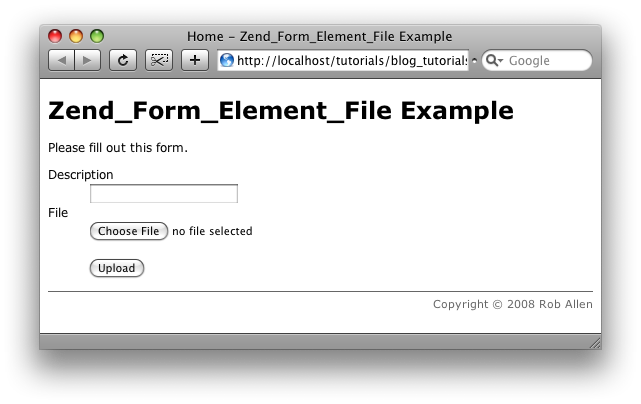
Let’s start with the form:
The form
We extend Zend_Form and store it in the application/forms folder and so the class name is forms_UploadForm:
<?php

class forms_UploadForm extends Zend_Form
{
    public function __construct($options = null)
    {
        parent::__construct($options);
        $this->setName('upload');
        $this->setAttrib('enctype', 'multipart/form-data');

        $description = new Zend_Form_Element_Text('description');
        $description->setLabel('Description')
                  ->setRequired(true)
                  ->addValidator('NotEmpty');

        $file = new Zend_Form_Element_File('file');
        $file->setLabel('File')
            ->setDestination(BASE_PATH . '/data/uploads')
            ->setRequired(true);

        $submit = new Zend_Form_Element_Submit('submit');
        $submit->setLabel('Upload');

        $this->addElements(array($description, $file, $submit));

    }
}
Note that BASE_PATH is not automatically defined within Zend Framework, so you would have define it yourself within your bootstrap.
As before, we set the name and enctype attribute of the form to allow for files to be uploaded. The form itself has two fields: a text field called ‘description’ and the file upload field called ‘file’, along with a submit button. Nothing especially complicated here.
The Zend_Form_Element_File element has a setDestination() method which is used to tell the underlying Zend_File_Transfer_Adapter_Http where we want the file that is uploaded to be stored. In this case we choose data/uploads.
The controller & view
The controller is also very standard:
<?php
class IndexController extends Zend_Controller_Action
{
public function indexAction()
{
$this->view->headTitle('Home');
$this->view->title = 'Zend_Form_Element_File Example';
$this->view->bodyCopy = "Please fill out this form.
";
$form = new forms_UploadForm();
if ($this->_request->isPost()) {
$formData = $this->_request->getPost();
if ($form->isValid($formData)) {
// success - do something with the uploaded file
$uploadedData = $form->getValues();
$fullFilePath = $form->file->getFileName();
Zend_Debug::dump($uploadedData, '$uploadedData');
Zend_Debug::dump($fullFilePath, '$fullFilePath');
echo "done";
exit;
} else {
$form->populate($formData);
}
}
$this->view->form = $form;
}
}
The view, views/scripts/index.phtml, is trivial:
<h1>< ?= $this->title; ?></h1>
<?= $this->bodyCopy; ?>
<?= $this->form; ?>
If the form validates correctly, the $uploadedData array will contain the values of the form fields along with the filename of the file that was uploaded. Note that this filename is not fully qualified, so if you need the entire path to the file, then use the getFileName() method on the file element.
Conclusion
That’s all there is to it for simple uploading of forms. There are still a few fairly important bugs in the component that we’ll have to wait for 1.7.2 for. Specifically the Count validator doesn’t always work as you’d expect and don’t use getValues() and receive() as it isn’t yet clever enough to know not to call move_uploaded_file() more than once.
As usual, here’s a zip file of the project I created to test this: Zend_Form_Element_File_Example.zip (including Zend Framework (a snapshot of the release-1.7 branch) which is why it’s 3.9MB large).



For Zend_Form you can use the "init"-function. Look at the quick start tutorial: http://framework.zend.com/docs/quickstart/create-a-form
John,
Yep – init() in place of using the standard constructor works fine.
Regards,
Rob…
Hi Rob my name is gonzalo benitez i have a question.. i am developing a multilanguage website, and i had choosen the array form notation to display the options like filter, validators, labes etc.- because it seemed faster and better to me. The problem is that is more dificult to translate with poedit because the strings. What do you think about it?
Gonzalo,
I think you'll get a better answer on the i18n mailing lists where there are people who understand translation issues much better than I do!
Regards,
Rob…
Thanks anyway! great example cheers
Hi Rob, thank you for sharing. (I found the bug about count validator too)
Maybe I'm wrong but it seems to be not possible use 'setErrorMessages()' as method of Zend_Form_Element_File as usually used for remaining fields. There's any workaround for this?
Regards,
Fabrizio
You should also have mentioned that the implementation of Zend_Form_Element_File is delivered with many validators and some filters which allow much more flexibility than a simple upload.
For your information: getValues() does not return the full path for security reasons.
Btw: The multiple receivement bug was fixed on the same day you reported it.
Greetings,
Thomas ( the one who made this component :-) )
Hi Thomas,
Yeah – there are many validators available for Zend_Form_Element_File, but I didn't want to complicate the basic usage :)
I was glad to see the multiple receive() issue solved so quickly, but it's a shame it missed 1.7.1. I should have played with this stuff a week or so earlier!
Regards,
Rob…
Nice post. Thank you for the info. Keep it up.
Doesn't this cause race conditions when multiple users concurrently upload a file named a.ext?
Sebastian,
Probably :)
Rob…
But of course only when they upload the same file within the same millisecond. :-)
And that's a rare race condition (you would get an error/exception as user in this case)
Greetings
Thomas
I'm working on a project using Zend_Form_Element_File myself right now, and I'm interested in how you'd handle a situation where you need to rename the file based on a database quey (lastinsertid.) Its pretty obvious that this element is fairly new, because its really a major security flaw to not have anything in place to easily rename the uploaded file based on critera like a userid or a pictureid. You can set it to not overwrite an existing file, at least closing the hole of your admin's profile getting overwritten with goatse, but that also makes it quite hard to upload generic sounding files (how many people might name a file profile.jpg? I'm guessing more than one on the entire internet) or even impossible in a situation where you're collecting the same exact file from people ("Upload config.ini here please.") Right now the only way I can see to do this cleanly would be to massively extend the file element, and have my own functions for recieve etc in my class that take an id or something. The only other thing I could think of was do an if(isuploaded) and then go in and setdestination() after doing whatever needs to be done to make it a unique filename.
@Zach:
Don't you think that this is quite unhandy ?
Wouldn't it be better to use the Rename Filter instead of extending the form element ? ;-)
Greetings
Thomas
Its kind of a chicken and the egg thing, unless I'm missing something though. I'm really new to Zend Framework so I'd love if you could correct me, but I want to rename the file with a unique id number, but I can only create that unique ID number after the file has uploaded and and the move filter has been triggered?
Or could I set the filter after isuploaded() but before receive()?
Simplified:
if (isUploaded) {
$adapter->addFilter('Rename', $myownname);
if (isValid) {
$adapter->receive();
} else {
print "Oops";
}
}
Greetings
Thomas
Thanks!
I used Zend_Form_Element_File to upload a file to webserver through a Zend_form class. How could I use the same class to download the file uploaded previously? I would appreciate any help.
Thank you,
Flávio.
Why still Zend_form_element_file has wrong name when is nested in subform? It is because Multi-Page forms are not officially supported in Zend_Form?
This problem was closed, please take a look
http://framework.zend.com/issues/browse/ZF-5835
Please Thomas help me.
Hi Rob, could you explain me how to set a custom message when user had not uploaded any file when setRequired(true).
Hello,
I am having problems validating a form with a file element in my application.
I am building an application that requires that I show 2 sub forms in a mult page format. The first sub form is always
the same and the second sub form shown will depend on the drop-down list of categories and subcategories selected in the
first sub form.
My form class contains this category sub form(the first sub form) and about 8 other sub forms (one of which will be
displayed depending on the information given in the first sub form). The reason is that the data I am collecting
is different for a lot of the categories. Some are however the same so the 8 sub forms include a more generic one
which is the parent class. This is also reflected in the database table structure. I have been able to get all
the logic for in my code for displaying the relevant sub form. Each second sub form includes a file element for
uploading pictures.
My controller class ProductController has the addAction that displays the initial subform through a function
I call getFirstSubform.
The post request from the first subform goes to a processAction which decides which sub form
to desplay as the second. The second and final subform also makes a trip to the same processAction of the
same controller. So the processAction has a logic to distinguish between these two POST request and to obtain the
appropriate post data. In the fist subform request, I save these post data as session variables for later
retrieval when saving to the database since these variables will be lost when making another browser request.
After running the function getNextSubForm() to return an instance of the relevant second subform. I have given an
explanatory code so you know what I am trying to do. During debugging I had the following observations.
1. The form validates correctly when I do not add the file element for the pictures. When added it fails validation.
2. When I include validators for the file elemement like addValidator('Count', false, array('min' => 0, 'max' => 6)),
addValidator('Size' false, '4MB'), addValidator('Extension', false, array('jpg', 'jpeg', 'png', 'gif')), I don't
get any error message on form but it still fails validation and the form is repopulated.
3. When I do not include these validators, I get the error message: File 'pictures' exceeds the defined ini size.
I have made sure my second subform is set to enctype="multipart/form-data". I even explicitly set my first subform
to this enctype during debugging just in case this was causing the error.
In my PHP.ini file I have set post_max_size = 500M, upload_max_filesize = 500M, just to be sure this is not what
is causing the error.
4. After retrieving $form form session in processAction, when I do $form->removeElement('pictures') just before
the validation block, the validation works.
5. When I upload a file. 'error' is set to int(0). When I don't upload anything it's set to int(4). I don't find any
in default temp folder C:wamptmp after submiting the last form but will see the tempfile for a moment then it
will quickly vanish. I can't see it in the folder I set if I include the method setDestination() on the file
element.
array
'pictures' =>
array
'name' => string 'this.jpg'
'type' => string 'image/jpeg'
'tmp_name => 'C:wamptmpphp93D.tmp'
'error' => int 0
'size' => int 178993
Note: I am NOT using ajax, jQuery, or javascript on this subform at the moment. Only using Zend_Form_whatever.
I am using Zend Framework 1.11.9. with WAMP
Can you please help. I have been scratching my head on this for days.
subform = $form;
}
else {
//request coming from second subform
$form_data = $request->getPost()
$form = $SESSION['productController']['subform'];
Zend_Debug::dump($_FILES);
if ($form->isValid($form_data)) {
// retrieve data from fist subform and save in variables
foreach ($form_data as $key => $value) {
//save post data into database tables depending on second subform displayed
if ($key == 'car') {
// I am always choosing same options from first sub form so that I always
// get this sub form for debugging purposes.
$title = $value['title'];
…
…etc.
$uploaded_data = $form->getValues();
// $fullFilePath = form->pictures->getValues()
}
elseif (…) {
…
…
elseif (…) {
…
…
}
}
$this->render('confirmation');
exit;
}
else {
$form->populate($form_data);
}
}
}
subform = $form;
}
else {
//request coming from second subform
$form_data = $request->getPost()
$form = $SESSION['productController']['subform'];
Zend_Debug::dump($_FILES);
if ($form->isValid($form_data)) {
// retrieve data from fist subform and save in variables
foreach ($form_data as $key => $value) {
//save post data into database tables depending on second subform displayed
if ($key == 'car') {
// I am always choosing same options from first sub form so that I always
// get this sub form for debugging purposes.
$title = $value['title'];
…
…etc.
$uploaded_data = $form->getValues();
// $fullFilePath = form->pictures->getValues()
}
elseif (…) {
…
…
elseif (…) {
…
…
}
}
$this->render('confirmation');
exit;
}
else {
$form->populate($form_data);
}
}
}
I have a problem with uploading files using ajax. But if I use common submit button everything is ok. What should I do? It seems that this source code works not correctly(but if I delete the body of method and write $this->view->res = true I see correct result of ajax exchange):
public function indexAction()
{
$this->view->headTitle('Home');
$this->view->title = 'Zend_Form_Element_File Example';
$this->view->bodyCopy = "Please fill out this form.";
$form = new forms_UploadForm();
if ($this->_request->isPost()) {
$formData = $this->_request->getPost();
if ($form->isValid($formData)) {
// success – do something with the uploaded file
$uploadedData = $form->getValues();
$fullFilePath = $form->file->getFileName();
Zend_Debug::dump($uploadedData, '$uploadedData');
Zend_Debug::dump($fullFilePath, '$fullFilePath');
echo "done";
exit;
} else {
$form->populate($formData);
}
}
$this->view->form = $form;
}
Could you help me please?
By the way, could you send me (or upload to somewhere) the example of uploading files using ajax(I use YUI library as in your book)? I would be very grateful. Thanks a lot.
I've solved this problem several days ago. So you may delete previous posts if you want.
Hey Rob,
Nice and clear but I was wondering why you are calling populate() if the form isn't valid?
As far as I know the form is already populated with the values if you call isValid(), when Zend_Form::isValid() is calling Zend_Form_Element::isValid() in it's iteration automatically Zend_Form_Element::setValue() is called when the element is calling it's validators.