Zend Framework URL Rewriting in IIS6
I’ve written before about URL rewriting with IIS7’s URL Rewrite module.
IIS6, which ships with Windows Server 2003 does not have this module though and guess which version my client’s IT dept run? As usual, they wouldn’t install ISAPI_Rewrite or one of the other solutions for me. In the past, I’ve simply written a new router that creates URLs with normal GET variables, but this is ugly and I wanted better.
One thing IIS6 does let you do is configure a URL to be called upon a 404 error, which then allows you to have “pretty” URLs and be able to route them.
Firstly, I set up the URL handler in the IIS Manager:
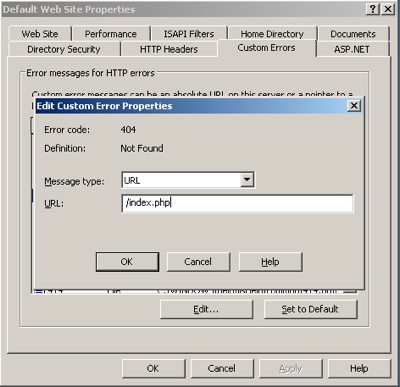
This will result in all unrecognised URLs being redirected to index.php. The standard Zend_Controller_Request_Http object will automatically extract the URL and routing works as expected.
However, there are three problems:
- The $_POST array is always empty
- $_SERVER[‘REQUEST_METHOD’] is always GET, even for a post request
- The first key in $_GET has been mangled by IIS
As Zend Framework wraps up the request into a Request object, this is fairly simple to work around by creating our own Request object.
class App_Controller_Request_Iis404 extends Zend_Controller_Request_Http

{

    /**

     * Constructor

     *

     * If a $uri is passed, the object will attempt to populate itself using

     * that information.

     *

     * @param string|Zend_Uri $uri

     * @return void

     * @throws Zend_Controller_Request_Exception when invalid URI passed

     */

    public function __construct($uri = null)

    {

        // As Zend_Controller_Request_Http accesses the superglobals directly, we

        // will have to write into $_GET and $_POST directly
// The post variables can be accessed from php://input
$input = file_get_contents('php://input');
if (strlen($input)) {
$input = urldecode($input);
parse_str($input, $_POST);
}
// fix $_GET
foreach ($_GET as $key=>$value) {
if (substr($key, 0, 4) == '404;') {
// special key created by IIS - the actual key name is after the ?
$bits = explode('?', $key);
if (count($bits) > 1) {
$_GET[$bits[1]] = $value;
}
}
}
return parent::__construct($uri);
}
/**
* Return the method by which the request was made
*
* @return string
*/
public function getMethod()
{
if (!empty($_POST)) {
return 'POST';
}
return parent::getMethod();
}
}
We start by reading the php://input stream which on a POST request will hold the POST variables. We can then transfer them to the $_POST array. Similarly, the key in the $_GET array that has been mangled, is easy to detect as it starts with ‘404;’. We can then find the ? and the part after it is the real key, so we create a new $_GET element for that item. Finally, we override getMethod() and return ‘POST’ if there are any elements in $_POST.
To use a custom Request object, you need to create an _init method in your Bootstrap:
class Bootstrap extends Zend_Application_Bootstrap_Bootstrap

{

    function _initIis404RequestObject()

    {

        $options = $this->getOptions();

        $this->bootstrap('frontController');

        $frontController = $this->getResource('frontController');

        $frontController->setRequest($options['frontController']['requestClass']);

    }
Zend Framework’s standard URLs now work nicely with IIS6 on Window Server 2003.



You can always use this.
http://iirf.codeplex.com
Works a charm and is free!
Lee,
You assume that the client's IT dept will let you install iirf :)
Regards,
Rob…
Indeed :o)
Hi,
thanks for this tutorial, i'm starting to use Zend framework but i has the same problem for my projects.
I just need an explanation about App_controller_request_iis404. where do you place this code ?
Thanks for your answer !
UNi,
library/App/Controller/Request/Iis404.php
Regards,
Rob…
Hi,
This does not work when submitting forms with a file i.e. when uploading files.
Does anyone know how to change this so that it works for file uploads?
Thanks in advance.
Regards,
Lawrence.
ah yes. I was gonna update about this. It's a nuisance.
I ended up setting module, controller and action params in my form as hidden fields and then hacking like this in index.php:
if (isset($_SERVER['REQUEST_METHOD']) && $_SERVER['REQUEST_METHOD']== 'POST') {

    if(isset($_SERVER['REQUEST_URI']) && strstr($_SERVER['REQUEST_URI'], 'index.php')) {

        $module = isset($_POST['module']) ? $_POST['module'] : 'site';

        $controller = isset($_POST['controller']) ? $_POST['controller'] : 'index';

        $action = isset($_POST['action']) ? $_POST['action'] : 'index';
$baseUrl = substr($_SERVER['REQUEST_URI'], 0, strpos($_SERVER['REQUEST_URI'], '/index.php'));
$_SERVER['HTTP_X_REWRITE_URL'] = "$baseUrl/$module/$controller/$action";
}
}
It's not elegant though.
Rob…
Hi Rob,
Thanks for your quick reply.
I can't seem to get this to work. My index.php is based on the "Quickstart" version on the Zend Documentation site – could this have an impact? The reason I mention this is because I have seen vastly different index.php files being defined. My index.php looks like this:
bootstrap()
->run();
PS: I am a total Zend newbie.
Regards,
Lawrence.
Sorry, some of the code seemed to be missing in my previous paste:
———————————-
defined('APPLICATION_PATH')
|| define('APPLICATION_PATH', realpath(dirname(__FILE__) . '/../application'));
// Define application environment
defined('APPLICATION_ENV')
|| define('APPLICATION_ENV', (getenv('APPLICATION_ENV') ? getenv('APPLICATION_ENV') : 'development'));
// Ensure library/ is on include_path
set_include_path(implode(PATH_SEPARATOR, array(
realpath(APPLICATION_PATH . '/../library'),
get_include_path(),
)));
/** Zend_Application */
require_once 'Zend/Application.php';
// Create application, bootstrap, and run
$application = new Zend_Application(
APPLICATION_ENV,
APPLICATION_PATH . '/configs/application.ini'
);
$application->bootstrap()
->run();
Hi.
I followed the steps of this article, but I got this error message:
"PHP Fatal error: Uncaught exception 'Zend_Controller_Exception' with message 'Invalid request class' in F:xxxtestinglibraryZendControllerFront.php:454…"
This error message can be related with URL Rewriting in IIS6?
Hello, I still have some problems. If I change $frontController->setRequest($options['frontController']['requestClass']); for $frontController->setRequest($moduleRequest); I dont have the error mess 'Invalid request class'. I have the error message 'Configuration array must have a key for 'dbname'. If I dont change $frontController->setRequest($options['frontController']['requestClass']); I keep getting the error mess 'Invalid request class'.
I have the same problem as Luis. For some reason it is not finding the pp_Controller_Request_Iis404 class.
Have you got an:
autoloadernamespaces[] = "App_"somewhere in your configs/application.ini file?
Regards,
Rob…
Rob..thanks for the reply. I do not have autoloadernamespaces[] = "App_"
anywhere. Should I have?
My application.ini looks like this…
[production]
phpSettings.display_startup_errors = 1
phpSettings.display_errors = 1
includePaths.library = APPLICATION_PATH "/../library"
bootstrap.path = APPLICATION_PATH "/Bootstrap.php"
bootstrap.class = "Bootstrap"
appnamespace = "Application"
resources.frontController.controllerDirectory = APPLICATION_PATH "/controllers"
resources.frontController.params.displayExceptions = 1
[staging : production]
[testing : production]
phpSettings.display_startup_errors = 1
phpSettings.display_errors = 1
[development : production]
phpSettings.display_startup_errors = 1
phpSettings.display_errors = 1
resources.frontController.params.displayExceptions = 1
I am just getting started with Zend for a class project and of course they are running IIS 6 and refuse to allow a rewrite Isapi.
Mike,
Add it to the projection section.
Regards,
Rob..
Rob,
Thanks again for the reply. I am still having some issues with your work around. I think the main issue may be my lack of knowledge on Zend infrastructure. I did what you asked and here is my application.ini
[production]
phpSettings.display_startup_errors = 1
phpSettings.display_errors = 1
includePaths.library = APPLICATION_PATH "/../library"
bootstrap.path = APPLICATION_PATH "/Bootstrap.php"
bootstrap.class = "Bootstrap"
appnamespace = "Application"
resources.frontController.controllerDirectory = APPLICATION_PATH "/controllers"
resources.frontController.params.displayExceptions = 1
[staging : production]
[testing : production]
phpSettings.display_startup_errors = 1
phpSettings.display_errors = 1
[development : production]
phpSettings.display_startup_errors = 1
phpSettings.display_errors = 1
resources.frontController.params.displayExceptions = 1
[projection]
autoloadernamespaces[] = "App_"
I still get the error:
Notice: Undefined variable: options in C:InetpubwwwrootapplicationBootstrap.php on line 9
Fatal error: Uncaught exception 'Zend_Controller_Exception' with message 'Invalid request class' in C:InetpubwwwrootlibraryZendControllerFront.php:454 Stack trace: #0 C:InetpubwwwrootapplicationBootstrap.php(9): Zend_Controller_Front->setRequest(NULL) #1 C:InetpubwwwrootlibraryZendApplicationBootstrapBootstrapAbstract.php(666): Bootstrap->_initIis404RequestObject() #2 C:InetpubwwwrootlibraryZendApplicationBootstrapBootstrapAbstract.php(619): Zend_Application_Bootstrap_BootstrapAbstract->_executeResource('iis404requestob…') #3 C:InetpubwwwrootlibraryZendApplicationBootstrapBootstrapAbstract.php(583): Zend_Application_Bootstrap_BootstrapAbstract->_bootstrap(NULL) #4 C:InetpubwwwrootlibraryZendApplication.php(355): Zend_Application_Bootstrap_BootstrapAbstract->bootstrap(NULL) #5 C:Inetpubwwwrootpublicindex.php(25): Zend_Application->bootstrap() #6 {main} thrown in C:InetpubwwwrootlibraryZendControllerFront.php on line 454
Rob,
I think you mistyped what I was supposed to do. Here is my current application.ini. Still having a problem.
[production]
phpSettings.display_startup_errors = 1
phpSettings.display_errors = 1
includePaths.library = APPLICATION_PATH "/../library"
bootstrap.path = APPLICATION_PATH "/Bootstrap.php"
bootstrap.class = "Bootstrap"
appnamespace = "Application"
resources.frontController.controllerDirectory = APPLICATION_PATH "/controllers"
resources.frontController.params.displayExceptions = 1
autoloadernamespaces.app = "App_"
[staging : production]
[testing : production]
phpSettings.display_startup_errors = 1
phpSettings.display_errors = 1
[development : production]
phpSettings.display_startup_errors = 1
phpSettings.display_errors = 1
resources.frontController.params.displayExceptions = 1
Mike,
Sorry, I did mean [production].
The correct key is an array:
autoloadernamespaces[] = "App_"notautoloadernamespaces.app = "App_"
Regards,
Rob…
Rob,
I changed to autoloadernamespaces[] = "App_"
and that doesn't work either. I am getting the following error:
Notice: Undefined variable: options in C:InetpubwwwrootapplicationBootstrap.php on line 9
Fatal error: Uncaught exception 'Zend_Controller_Exception' with message 'Invalid request class' in C:InetpubwwwrootlibraryZendControllerFront.php:454 Stack trace: #0 C:InetpubwwwrootapplicationBootstrap.php(9): Zend_Controller_Front->setRequest(NULL) #1 C:InetpubwwwrootlibraryZendApplicationBootstrapBootstrapAbstract.php(666): Bootstrap->_initIis404RequestObject() #2 C:InetpubwwwrootlibraryZendApplicationBootstrapBootstrapAbstract.php(619): Zend_Application_Bootstrap_BootstrapAbstract->_executeResource('iis404requestob…') #3 C:InetpubwwwrootlibraryZendApplicationBootstrapBootstrapAbstract.php(583): Zend_Application_Bootstrap_BootstrapAbstract->_bootstrap(NULL) #4 C:InetpubwwwrootlibraryZendApplication.php(355): Zend_Application_Bootstrap_BootstrapAbstract->bootstrap(NULL) #5 C:Inetpubwwwrootpublicindex.php(25): Zend_Application->bootstrap() #6 {main} thrown in C:InetpubwwwrootlibraryZendControllerFront.php on line 454
BTW the path to the App_Controller_Request_Iis404 class is libraryAppControllerRequestIis404.php
Here is my bootstrap.php:
bootstrap('frontController');
$frontController = $this->getResource('frontController');
$frontController->setRequest($options['frontController']['requestClass']);
}
}
class Bootstrap extends exend_Application_Bootstrap_Bootstrap
{
function _initIis404RequestObject()
{
$this->bootstrap('frontController');
$frontController = $this->getResource('frontController');
$frontController->setRequest($options['frontController']['requestClass']);
}
}
Mike,
You need an:
$options = $this->getOptions();in your _initIis404RequestObject() method.
Rob…
Still no dice. I am sorry to be such a pain. I basically just copied and pasted your code into files in my application. I really like this solution but it doesn't seem I can get it working.
current error:
Notice: Undefined index: frontController in C:InetpubwwwrootapplicationBootstrap.php on line 10
Fatal error: Uncaught exception 'Zend_Controller_Exception' with message 'Invalid request class' in C:InetpubwwwrootlibraryZendControllerFront.php:454
Stack trace:
#0 C:InetpubwwwrootapplicationBootstrap.php(10): Zend_Controller_Front->setRequest(NULL)
#1 C:InetpubwwwrootlibraryZendApplicationBootstrapBootstrapAbstract.php(666): Bootstrap->_initIis404RequestObject()
#2 C:InetpubwwwrootlibraryZendApplicationBootstrapBootstrapAbstract.php(619): Zend_Application_Bootstrap_BootstrapAbstract->_executeResource('iis404requestob…')
#3 C:InetpubwwwrootlibraryZendApplicationBootstrapBootstrapAbstract.php(583): Zend_Application_Bootstrap_BootstrapAbstract->_bootstrap(NULL)
#4 C:InetpubwwwrootlibraryZendApplication.php(355): Zend_Application_Bootstrap_BootstrapAbstract->bootstrap(NULL)
#5 C:Inetpubwwwrootpublicindex.php(25): Zend_Application->bootstrap()
#6 {main} thrown in C:InetpubwwwrootlibraryZendControllerFront.php on line 454
Is this approach meant to work with Zend_Amf? I get NetConnection.Call.BadVersion errors on my AMF requests.
Drake,
I've never used Zend_Amf, so I have no idea.
Regards,
Rob…
Thanks so much for posting this, some godaddy servers have mangled $_POST and $_GET vars and this at least gets me my $_POST vars…