Getting Started with Zend Framework 1.12
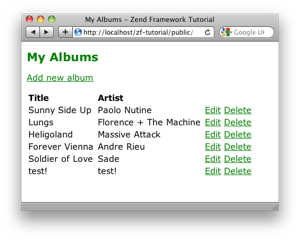
This tutorial is intended to give an introduction to using Zend Framework 1 to write a simple database driven application. It has been updated for the newer versions of the framework and takes full advantage of the Zend_Tool command line script and Zend_Application for bootstrapping. Other components used include Zend_Controller, Zend_View, Zend_Db_Table and Zend_Form.
I have also written a tutorial on Zend_Auth.
This tutorial has been tested on version 1.10, 1.11 and 1.12 of Zend Framework. It may not work on any version prior to version 1.10.
If you are deploying to a “user” site (e.g. http://localhost/~rob), then you need a RewriteBase line in your .htaccess file that looks something like: RewriteBase /~rob/zf-tutorial/public/.
Translations
Very kindly, these people have provided translations of this tutorial into other languages. Thank you!
Italian version: Introduzione allo Zend Framework. Translated by Mario Santagiuliana.
Polish version: Pierwsze kroki z Zend Framework. Translated by Radosław Benkel.
Portuguese version: Iniciando com o Zend Framework. Translated by Gilberto Albino.
French version: Débuter avec Zend Framework. Translated by Bernard Opic.
Also, this page has been translated to Slovenian, by Damian Erjavec
Code
The associated code is available:
Further reading
Once you have finished this tutorial, consider buying my book, Zend Framework in Action. Also, the Quick Start is worth reading.
Chris Kirk has kindly provided a Q&A PDF for the 1.8 version of the tutorial which may help if you are having problems.
Previous versions of this tutorial
There have been three previous versions of this tutorial:
- tutorial for Zend Framework 1.8 and 1.9
- tutorial for Zend Framework 1.5, 1.6 and 1.7
- tutorial for Zend Framework 1.0
Changelog
- 1.7.7 (18/Sep/2011)
- Typographical fixes
- 1.7.6 (16/Mar/2011)
- Typographical fixes
- 1.7.5 (3/Oct/2010)
- Typographical fixes
- 1.7.4 (25/Jul/2010)
- Move setting the title to the view scripts and use zf create dbtable to create the table class
- 1.7.3 (29/Jun/2010)
- Typographical fixes
- 1.7.2 (17/Apr/2010)
- Typographical fixes and use Zend_Form’s init() method
- 1.7.1 (11/Feb/2010)
- Fix code in deleteAction to use the correct model name
- 1.7.0 (7/Feb/2010)
- Significantly revised for Zend Framework 1.10


